The Real Cost of Ignoring PHP Updates (and How to Automate Compliance)


PHP 8.1 reaches end of life on December 31, 2025. After that date, it stops receiving updates or security fixes, and the version effectively becomes a liability. What makes this significant is how quickly it happened.
Two years ago, 8.1 was the standard. Now it’s entering the same unsupported territory that left PHP 7.x filled with unpatched vulnerabilities. This pace is normal for PHP’s lifecycle, but most companies don’t operate at that rhythm. Applications stay in production for years, and teams often assume the runtime will remain stable as long as the code still works.
The problem is that EOL affects the entire environment around it such as libraries, frameworks, hosting providers, compliance requirements, and integration partners. Once a version falls out of support, costs rise, audits get harder, and uptime becomes less predictable.
How the PHP Lifecycle Works
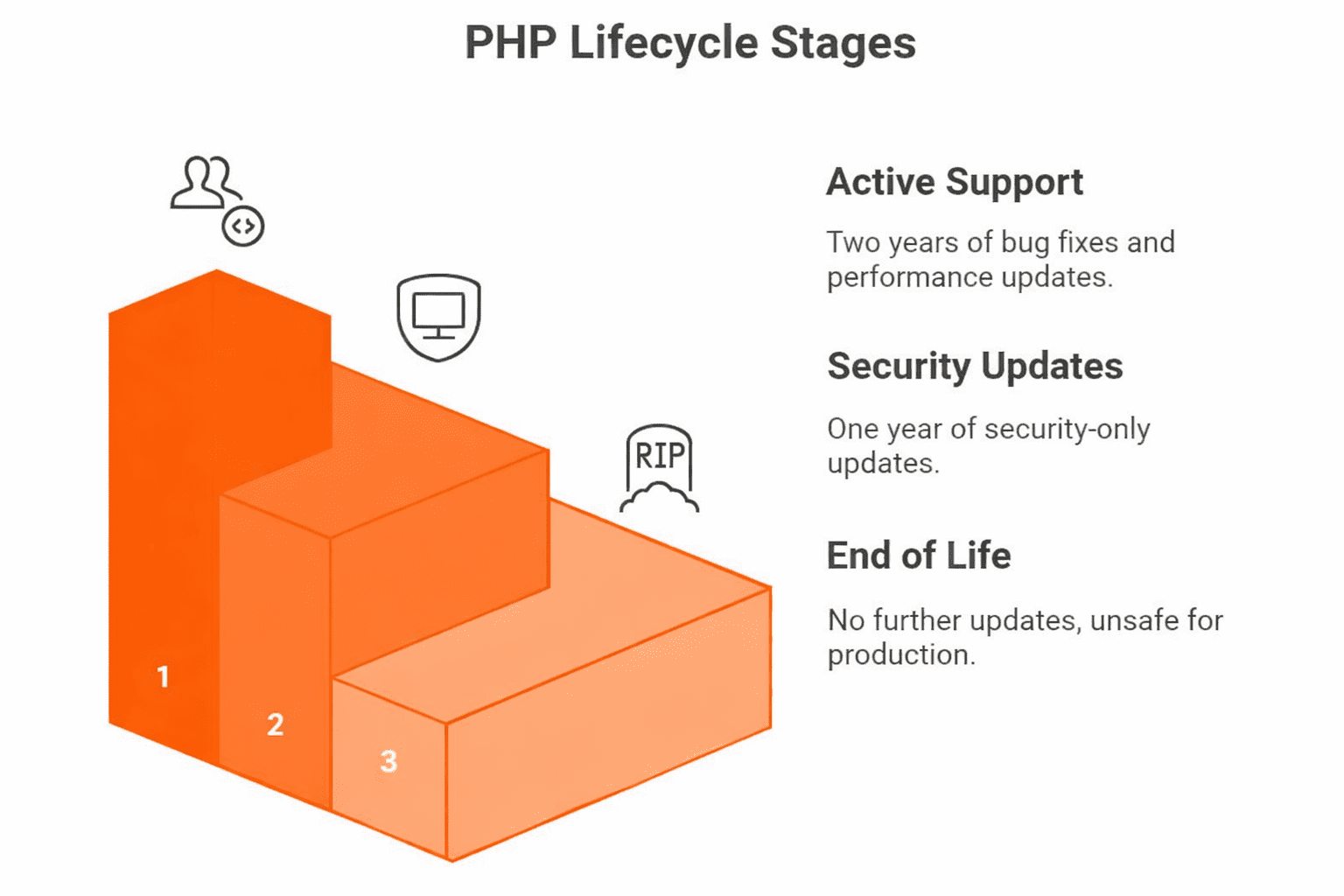
Each PHP release receives two years of active support, where bugs and performance issues are addressed, followed by one year of security-only updates. When that period ends, the version moves into End of Life (EOL). At that point, no further fixes are issued, and the runtime is considered unsafe for production environments.
EOL status creates immediate pressure across the stack because frameworks raise their minimum supported versions. Libraries start depending on newer language features. Composer updates become harder to apply because the dependency graph drifts away from what the old runtime can handle. SDKs for payments, authentication, storage, and analytics often lock out unsupported versions due to security requirements.
What gets impacted when PHP is unsupported:
- Framework requirements move ahead, so older applications lose access to new releases and security patches.
- Composer starts rejecting or freezing updates because packages shift their minimum PHP version.
- SDKs for payments, authentication, logging, and cloud services stop working or fail to install.
- Security tools and scanners expect supported runtimes and generate high-risk findings for outdated versions.
- CI pipelines become unstable as tooling updates drop compatibility with old language features.
- Hosting platforms phase out older runtimes, which forces emergency upgrades instead of planned ones.
- Third-party integrations get blocked during security reviews because the runtime doesn’t meet baseline requirements.
- Performance tuning and newer optimizations aren’t available, leaving the application slower under growing load.
The Hidden Costs of Ignoring PHP Updates
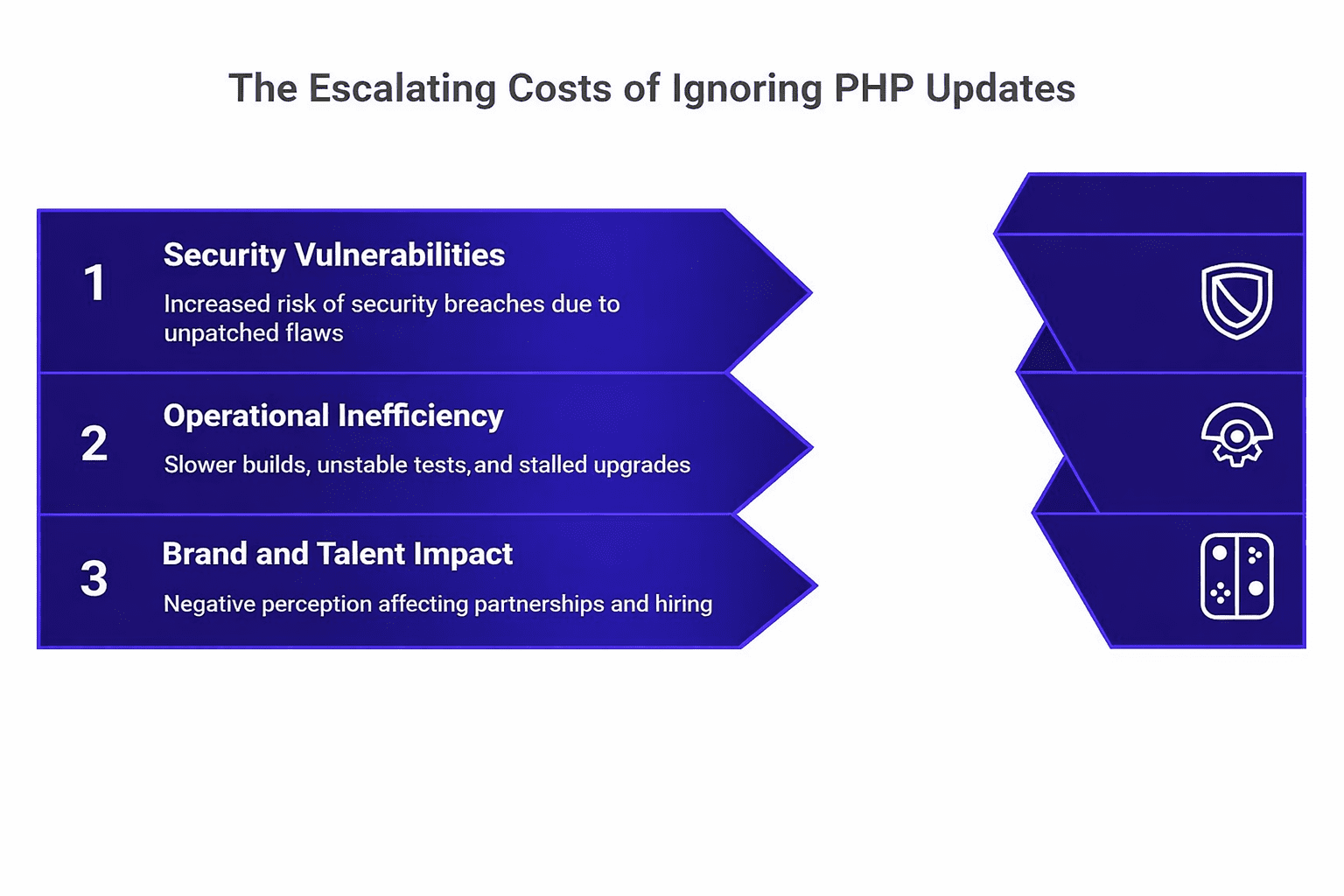
1. Security and Data Exposure
Unsupported PHP versions stop receiving security fixes the moment they hit End of Life. Any new vulnerability that appears after EOL stays unpatched. PHP 7.2–7.4 had well-known weaknesses in unserialize handling, memory corruption and path traversal. Attackers leaned on these issues because so many systems stayed on unsupported versions. Many real breaches came from these runtime flaws, not from the application code.
Common risks that show up in security reviews when a team stays on an outdated PHP version:
- Open CVEs with no available patches.
- Unsupported frameworks or libraries in the dependency graph.
- Insecure serialization flows that can’t be mitigated at the code level.
- Lack of runtime hardening due to missing security improvements in newer PHP versions.
- Audit findings tied to incomplete patch-management processes.
Every month spent on an unsupported version expands the attack surface and the compliance burden. Regulations such as GDPR, PCI DSS, and ISO 27001 treat overdue updates as a control failure. Auditors examine version hygiene as part of their assessment of operational security. Running an EOL version becomes a quantifiable liability that weakens an organization’s security posture and increases audit friction.
2. Operational Inefficiency
Old PHP versions create drag across the entire engineering pipeline. Here are the top impacts of outdated PHP versions.
- Builds slow down because toolchains attempt to support incompatible language features.
- Test suites become unstable as dependencies drop support for outdated runtimes.
- Dependency upgrades stall because the ecosystem gradually assumes newer versions, leaving older ones without compatible releases.
- Patch updates that should take minutes turn into manual troubleshooting sessions.
Teams compensate for this gap with hotfixes, custom patches, and emergency debugging. Maintenance work expands unpredictably, and the cost compounds each quarter.
3. Brand and Talent Impact
Teams see outdated PHP as a risk, and partners read it as a weakness in engineering standards and long-term reliability. Engineers see aging runtimes as a sign of organizational stagnation, and it lowers morale on teams already dealing with brittle tooling and unstable infrastructure. Hiring strong backend talent becomes harder because candidates associate old stacks with limited growth and slower processes.
Clients, partners, and vendors read these signals the same way. Outdated environments raise questions about long-term stability, integration reliability, and overall security discipline. Some vendors refuse integration with unsupported versions due to their own compliance requirements. Over time, this reduces opportunities for partnerships and slows down the ability to adopt new capabilities.
The cumulative effect is simple. Ignoring PHP updates increases security exposure, wastes engineering time, and weakens both internal and external confidence in the product. The financial and operational impact grows every year the system stays behind.
Compliance and Security Pressure Are Rising
ISO 27001 and SOC 2 reviewers pay attention to the PHP version a system is running and how often it’s updated. Auditors expect to see a supported runtime and a clear pattern of regular upgrades. When they find a version that has already passed its support window, they flag it as a security issue.
The same thing shows up in external reviews. Companies you need to integrate with, for example, payment platforms, identity providers or larger enterprise customers, run their own checks before approving a connection. They look at the PHP version in use, the date of the last upgrade and whether it’s still supported. If the runtime is outdated, the review slows down or stops until the upgrade work is completed.
Outdated PHP introduces friction on both the security and business side.
Legacy systems are now explicitly called out in security audits. They appear in risk registers, incident postmortems, and internal reviews. A system running on an EOL PHP version is treated as a maintained vulnerability rather than a neutral backlog item. The operational impact shows up in delayed integrations, blocked deployments, and increased audit remediation work.
Compliance and security expectations continue to tighten, and unsupported PHP versions create measurable, reportable gaps that affect both operations and business outcomes
Why Teams Delay PHP Updates
Teams usually fall behind on PHP updates for practical, not careless, reasons. Updating a runtime carries the perception of risk, especially in systems that have grown organically over several years. Many engineering groups worry about introducing failures in production because the application relies on older behavior, deprecated functions, or assumptions baked into legacy code. When test coverage is thin or uneven, that fear becomes a legitimate blocker.
Modernization also lacks a clear owner in many organizations. DevOps teams focus on deployment reliability, backend teams focus on feature delivery, and no one is explicitly responsible for lifecycle management. Without dedicated ownership, upgrades slip between priorities and accumulate as quiet debt.
Budget pressure reinforces this pattern. Stakeholders prioritize visible features, customer-facing improvements, and short-term product gains. Maintenance work doesn’t generate demos, sales pitches, or direct revenue, so runtime upgrades are routinely deprioritized. This creates a cycle where updates are postponed until they become urgent.
Teams delay updates because feature work takes priority and the system still appears to run fine. Delaying updates looks harmless at first, but the cost builds. Maintenance work grows as the risk of incidents rises, and the system becomes harder to defend in audits.
How to Automate PHP Upgrade Compliance
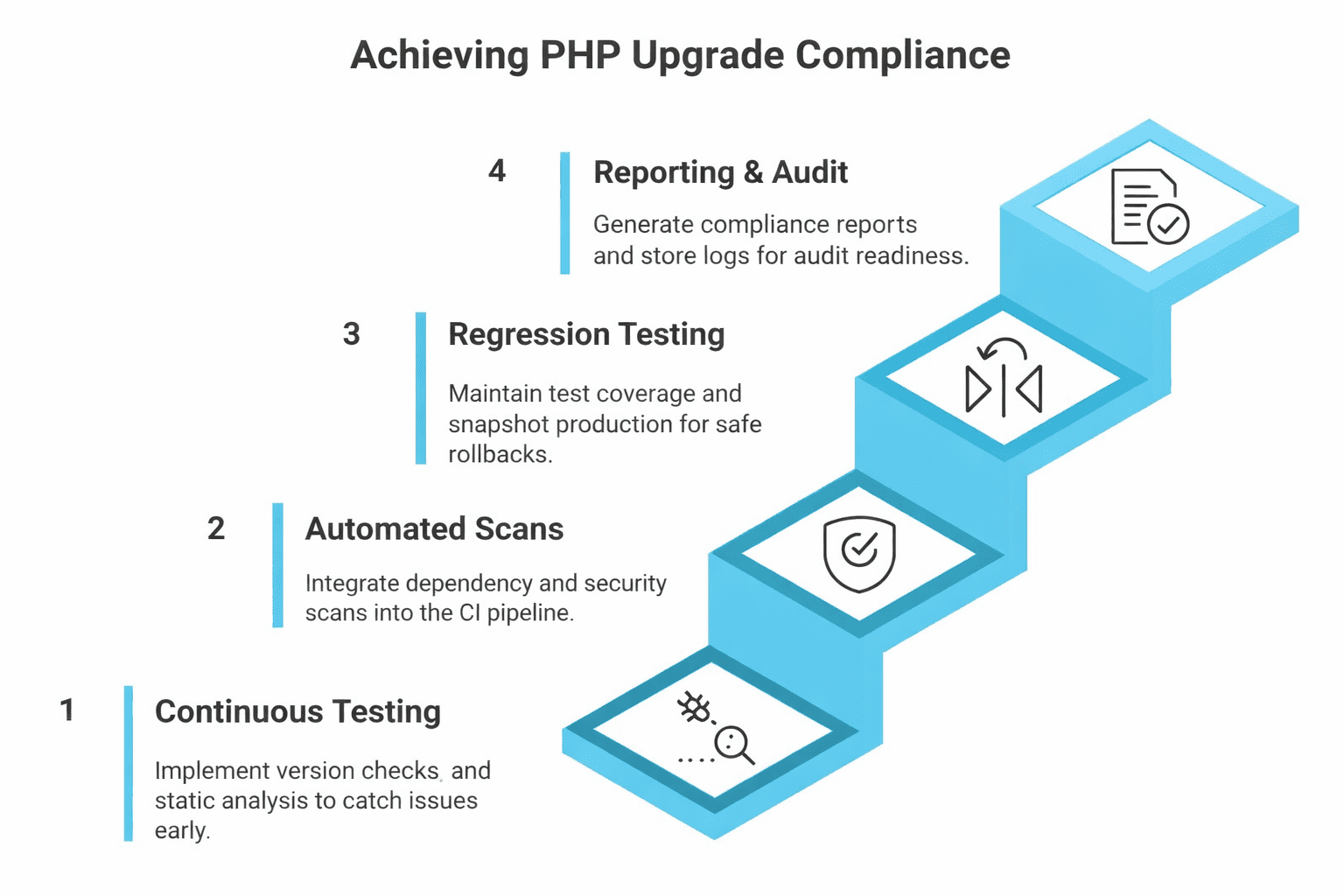
Continuous Compatibility Testing
Continuous compatibility testing makes upgrade issues visible long before they reach production. Version checks in CI are the starting point. They show immediately when the application begins drifting away from the PHP version you plan to adopt. Catching that drift during development gives the team time to fix it instead of dealing with a pile of failures at the end.
Running the full test suite in containers for both the current and target PHP versions gives you a clear picture of what will break. You see behavior changes, failing edge cases, deprecated features and framework calls that rely on newer internals. These problems show up early, not during a deployment window.
Static analysis adds another layer. Tools like PHPStan and Psalm catch method signature mismatches, deprecated functions, and type errors that newer runtimes will reject. Instead of discovering everything at once, the team sees blockers in small, manageable increments.
Quick checklist for Continuous Compatibility Testing:
- Add lightweight CI checks that alert you when the app starts drifting from the PHP version you plan to upgrade to.
- Run your test suite in containers for both versions so you can spot real behavior differences instead of guessing.
- Keep PHPStan or Psalm active at a level that actually surfaces problems rather than rubber-stamping builds.
- Watch for deprecated warnings since they usually hint at future breakage.
- Look at how failures evolve over time; repeating issues often point to deeper compatibility gaps.
This keeps the upgrade path clear and prevents surprises during release cycles.
Automated Dependency and Security Scans
Dependencies age faster than the runtime itself. Automated scanning prevents the ecosystem around your application from drifting into incompatibility.
Integrate composer audit directly into CI. Fail builds that introduce known vulnerabilities. This forces security fixes into the regular development cycle instead of deferring them to quarterly maintenance windows. Pair this with Renovate or Dependabot to generate automatic pull requests for PHP version bumps, library updates, and security patches. These tools maintain a constant flow of update opportunities instead of letting changes accumulate.
Real-time dependency monitoring highlights when packages shift their minimum PHP requirements. Once the ecosystem moves, the application must move with it. Automated scans ensure you see that shift immediately, giving teams time to react.
Regression Testing and Safe Rollback
Upgrades are far easier to handle when the system can return to a known good state at any moment. A rollback path removes most of the anxiety around version changes because the team always has a way out. Strong test coverage is the other anchor. When the core user flows, platform logic, and integration points are tested properly, failures show up early and with context. This makes it clear whether an issue comes from the PHP version itself, a library, or the application code.
Before rolling out a new PHP version, create a snapshot of the production image or container. This gives the team an immediate fallback if something behaves differently in staging or during the first wave of traffic. A working snapshot also encourages teams to upgrade more regularly because there is no fear of being locked into a broken deployment.
A staged rollout adds another layer of stability. Move the upgrade through development, staging, and a small canary group in that order. Watch the logs for unusual patterns, monitor error rates, and check performance under real traffic. Each stage gives feedback that is more realistic than the last. By the time the upgrade reaches full production, most surprises have already surfaced.
Reporting and Audit Readiness
Auditors want clear proof that a system is being maintained. Automated reporting provides that proof without creating extra work for the team.
Set up reports that show the PHP version in use, when it was last updated, which patches were applied, and how the dependency graph changed during the week. Include the output from security scans so reviewers can see which issues were found and how they were handled. This satisfies the evidence requirements in ISO 27001 and SOC 2 because it demonstrates an active and repeatable patch process.
Keep the supporting logs as well. CI results, scan history, and update records give a complete picture of the system’s maintenance timeline. When something needs to be explained in an audit or a security review, the information is already there.
Key elements of an automated PHP upgrade workflow:
- Regular version checks baked into CI. These warn you when PHP is out of date. They also show whether the application still behaves correctly under the next PHP version you plan to adopt, which gives teams months of lead time instead of days.
- Dependency updates that happen continuously, not quarterly. Automated tools open pull requests, surface conflicts and highlight packages that dropped support for your current PHP version. This prevents the dependency graph from freezing in place.
- Security scanning that runs on every change. Vulnerability checks tied to composer audits expose insecure libraries the moment they appear, rather than weeks later when someone remembers to run them.
- Regression tests that reflect real user paths. When these tests run against multiple PHP versions, you immediately see where business logic breaks or where the framework behaves differently.
- A reliable rollback path. Snapshots or build artifacts make it easy to revert if an upgrade introduces an unexpected issue. This removes most of the fear around deploying a newer PHP version.
- Automatic audit evidence. Logs from upgrade checks, scan results and version history create an ongoing record that satisfies ISO and SOC requirements without last-minute paperwork.
How Accesto Helps
Accesto focuses on modernizing large, complex PHP applications with heavy technical debt. Our approach creates a stable path for keeping PHP versions current and aligned with the wider ecosystem.
The team has more than a decade of experience working with long-lived SaaS products, enterprise platforms, and custom PHP systems. We understand how older codebases behave under version pressure, how frameworks evolve, and where upgrade blockers usually appear.
The Cost of Waiting vs the Value of Action
PHP updates aren’t background maintenance tasks. They shape security posture, engineering velocity, and the overall stability of the platform. The longer a system stays on an outdated version, the more those risks accumulate. Security gaps widen, compliance burdens grow, and routine development work becomes harder to deliver.
Automation makes PHP upgrades straightforward. Automation gives teams a clear view of compatibility, dependency health, and overall upgrade readiness. It removes the uncertainty from version changes and creates a steady rhythm for keeping the system current. Modernization fits naturally into the workflow instead of turning into a rushed emergency. The stack stays aligned with current standards, and engineers avoid the scramble that happens when an outdated runtime finally breaks.
The longer you delay, the more you pay. Talk to us today to see how we can help you reduce future costs.