Is it still safe to run AngularJS in 2026?


 Welcome to our From AngularJS to Angular series - for teams still running AngularJS: why waiting is a risk, which migration approach fits your app, and what are the most common ways to do that in practice.
TL;DR: Not in the sense your security team means. AngularJS support ended on 31 December 2021, and since then the npm package angular has collected ten security advisories, two of them rated high, every one of them stamped "Patched versions: None". Install 1.8.3 today with the companion packages a real application carries and npm audit reports a high-severity finding with nothing to upgrade to. A paid, patched fork exists; it buys time, not a future. Whether any of those advisories is exploitable in your own application is a separate question. Below: the audit output, one advisory worked through in full, and a checklist you can run against an existing application.
Every changing data point here was rechecked in a clean temporary project. "AngularJS is insecure" gets repeated constantly and almost never with a source.
Data snapshot, 27 October 2026. npm dist-tags, audit results, advisory records, severities and download counts can change after publication. npm can also revise totals for an already completed download period. The snapshot date and tool versions make the results reproducible, but a later run may legitimately differ.
What "end of life" means in practice
The last release of AngularJS is 1.8.3, published on 7 April 2022, a few months after long-term support officially ended on 31 December 2021. Install it today and npm says so itself.
npm warn deprecated [email protected]: For the actively supported Angular, see
https://www.npmjs.com/package/@angular/core. AngularJS support has officially
ended. For extended AngularJS support options, see https://goo.gle/angularjs-path-forward.
The code still runs. What stopped is narrower than the phrase suggests.
- No security fixes in the official line. Whatever gets found after 1.8.3 stays unfixed there. The one established supported alternative is a commercial fork, which we come back to further down.
- No compatibility fixes. When a browser changes behaviour, nobody is going to adjust the framework for you.
- The libraries around it stopped too, most of them earlier. The
latestdist-tag in the npm registry:
| Package | npm latest | Released |
|---|---|---|
| angular | 1.8.3 | April 2022 |
| angular-material (1.x) | 1.2.5 | April 2022 |
| angular-ui-bootstrap | 2.5.6 | October 2017 |
| restangular | 1.6.1 | January 2017 |
| textangular | 1.5.16 | December 2016 |
| ng-table | 3.0.1 | December 2016 |
| @uirouter/angularjs | 1.1.2 | December 2025 |
ui-router is the one exception in this sample and still ships releases. The rest have been frozen for four to ten years. Several of them carry advisories of their own, and a support contract for angular covers none of that.
ng-table needs one qualification: npm's latest tag points to 3.0.1, but 3.1.0 and 4.0.0 were also published later in December 2016, with 4.0.0 tagged next. The table reports what a plain npm install ng-table selects, not the highest version ever published.
The reproducible registry checks are npm view <package> dist-tags.latest for the selected version and npm view <package> time --json for its publication timestamp.
What npm audit says today
We installed a realistic dependency set in a clean temporary project and audited it with npm 11.18.0 on Node 22.23.1. This was the whole package.json.
{ "dependencies": {
  "angular": "1.8.3", "angular-route": "1.8.3", "angular-sanitize": "1.8.3",
  "angular-animate": "1.8.3", "angular-ui-router": "1.0.30",
  "angular-ui-bootstrap": "2.5.6", "angular-material": "1.2.5" } }
The relevant part of the output:
4 vulnerabilities (3 moderate, 1 high)

angular  *   severity: high
  Angular (deprecated package) Cross-site Scripting            GHSA-prc3-vjfx-vhm9
  AngularJS improperly sanitizes SVG elements                  GHSA-j58c-ww9w-pwp5
  angular vulnerable to regular expression denial of service   GHSA-m2h2-264f-f486
  AngularJS allows attackers to bypass image source restrictions GHSA-m9gf-397r-hwpg
  AngularJS allows attackers to bypass image source restrictions GHSA-mqm9-c95h-x2p6
  angular vulnerable to super-linear runtime due to backtracking GHSA-4w4v-5hc9-xrr2
  ReDoS via the angular.copy() utility                         GHSA-2vrf-hf26-jrp5
  ReDoS via the $resource service                              GHSA-2qqx-w9hr-q5gx
  ReDoS via the <input type="url"> element                     GHSA-qwqh-hm9m-p5hr
  Angular's deprecated package has a Cross-Site Scripting issue GHSA-7x27-g8rg-x87w
  fix available via npm audit fix --force
  Will install [email protected], which is a breaking change
angular-sanitize  >=1.3.1   severity: moderate
  AngularJS Incomplete Filtering of Special Elements           GHSA-4p4w-6hg8-63wx
  fix available via npm audit fix --force
  Will install [email protected], which is a breaking change

angular-material  >=0.8.1
  Depends on vulnerable versions of angular
angular-ui-router >=0.2.18
  Depends on vulnerable versions of angular
npm offers two nominal fixes: downgrading ui-router to 0.2.17 and downgrading angular-sanitize to 1.3.0, below the affected range. Both are breaking changes, neither upgrades AngularJS to a maintained release, and nobody should apply them blindly. Every advisory against the official angular package ends on the same line, "Patched versions: None".
npm audit sees only what npm installed. AngularJS pulled in through Bower, a CDN <script> tag or a copied angular.min.js sitting in the repository never appears in that output. The checklist below starts with the version served to the browser.
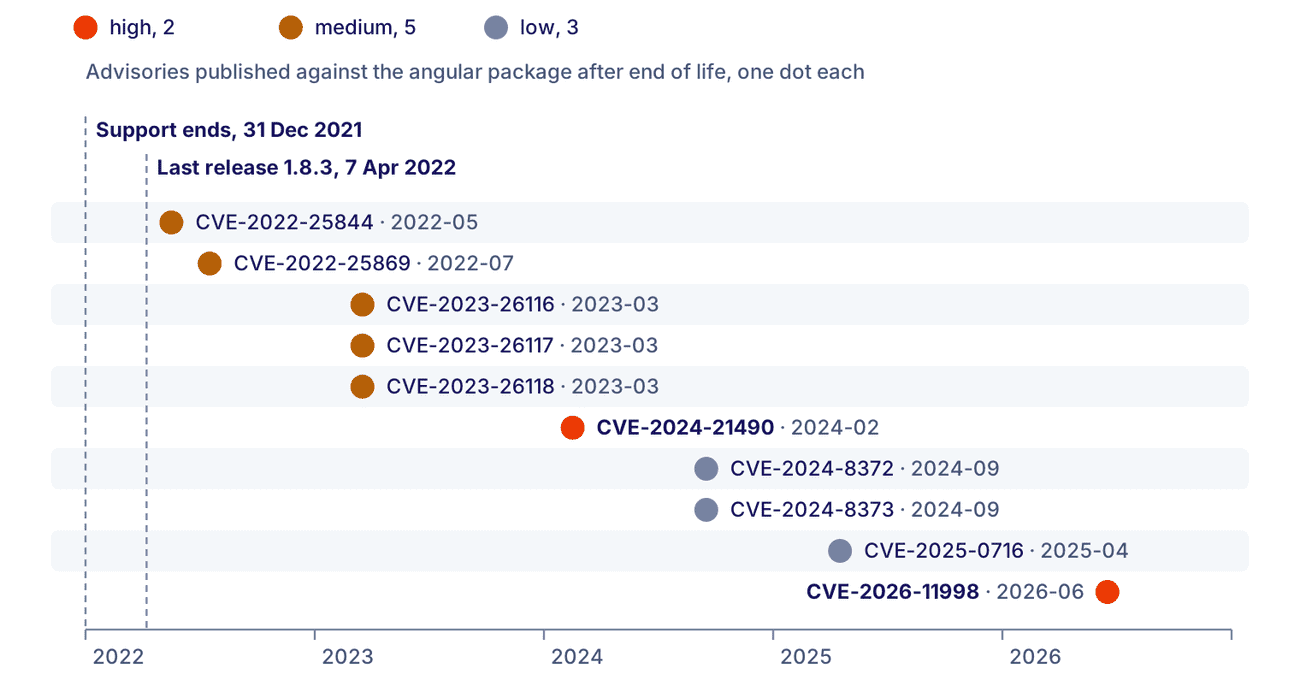
The full list of advisories filed against the angular package after end of life comes from the GitHub advisory database. Every CVE links to its advisory, and the conditions are worth reading at the source. The separate angular-sanitize finding in the audit is CVE-2025-2336; it is not one of the ten entries below because it belongs to a different npm package.
| Published | CVE | Severity | Issue | Needs |
|---|---|---|---|---|
| 2022-05 | CVE-2022-25844 | medium | ReDoS in number formatting | a custom locale rule with attacker-controlled posPre |
| 2022-07 | CVE-2022-25869 | medium | XSS via <textarea> interpolation | Internet Explorer page caching; IE only |
| 2023-03 | CVE-2023-26116 | medium | ReDoS via angular.copy() | attacker-controlled input reaching angular.copy() |
| 2023-03 | CVE-2023-26117 | medium | ReDoS via $resource | the separate ngResource module and an attacker-controlled $resource URL with a long run of slashes followed by a non-slash character |
| 2023-03 | CVE-2023-26118 | medium | ReDoS via <input type="url"> | attacker-controlled value in a URL input |
| 2024-02 | CVE-2024-21490 | high | ReDoS via ng-srcset | attacker-controlled string bound to ng-srcset |
| 2024-09 | CVE-2024-8372 | low | image source restriction bypass via srcset | attacker-controlled value bound through ngSrcset, ngAttrSrcset, ngPropSrcset or srcset interpolation where the application relies on image-source restrictions |
| 2024-09 | CVE-2024-8373 | low | same, via <source srcset> | attacker-controlled <source> value set through ngAttrSrcset or srcset interpolation; ngSrcset and ngPropSrcset are not affected by this CVE |
| 2025-04 | CVE-2025-0716 | low | SVG <image href> sanitisation | attacker-controlled SVG <image> URL set through ngHref, ngAttrHref or href interpolation where the application relies on image-source restrictions |
| 2026-06 | CVE-2026-11998 | high | SCE resource URL policy bypass | a regular expression in the trusted resource URL list that can match partially, and a resource URL (template, iframe, script) built from untrusted input |
Ten advisories in nearly five years, the most recent from June 2026. The severity column reproduces GitHub's rating; other databases and vendors sometimes score the same CVE differently. Your exposure depends on three other things: whether you use the feature at all, whether an attacker can supply the input it needs, and whether something in front of it stops that input first. CVE-2022-25869 shows how wide the gap gets. It is real, it is rated medium, and it needs Internet Explorer.
Showing that an advisory cannot be exploited in your application does not always settle the matter with customers. Some security questionnaires only ask whether you run end-of-life software or known CVEs, yes or no. Others leave room for a description of the mitigation and an exception that someone signs.
One advisory, worked through: CVE-2026-11998
Take the newest high one, one of the two advisories rated high in the table above. It is also the one where a quick grep for $sce. finds nothing and proves nothing.
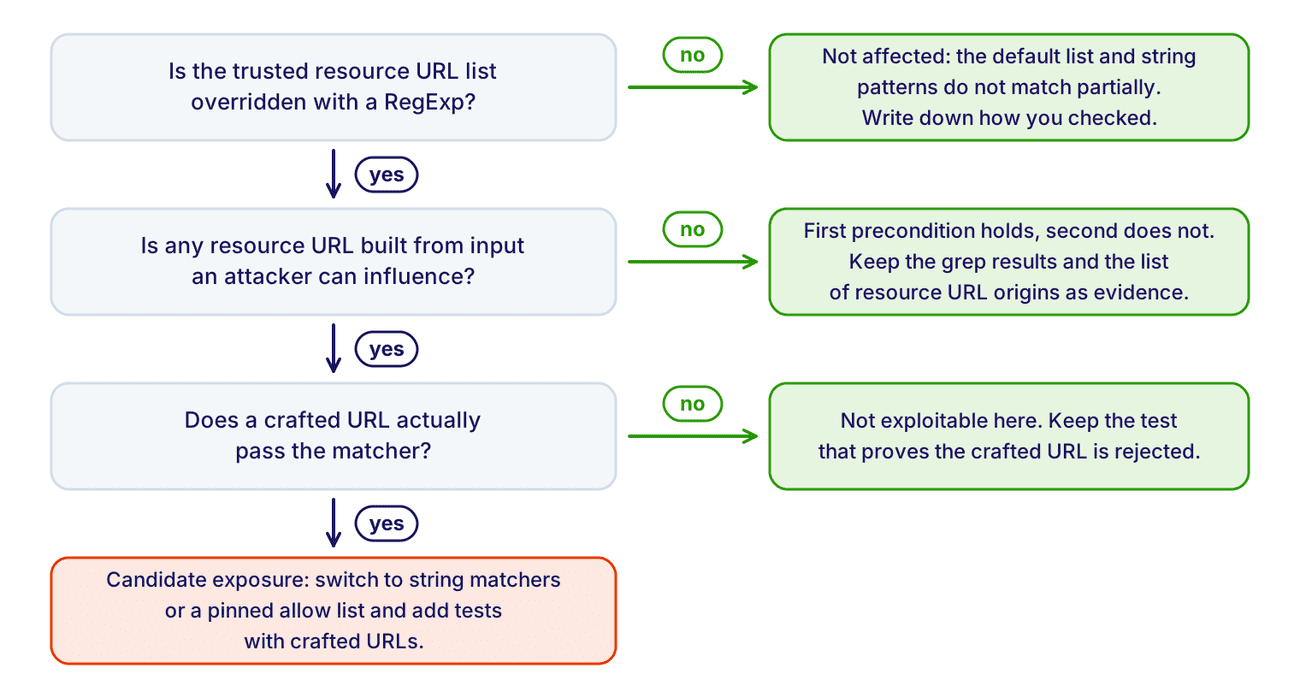
SCE is the mechanism AngularJS uses to decide which URLs may be loaded as templates, <iframe> documents or scripts. It matches URLs against the patterns in the trusted resource URL list, and with certain regular expressions, notably expressions with alternation, that match can be partial. A URL you never intended to trust then passes as trusted. Two conditions have to hold at the same time: the application configures the list with a regular expression that permits a partial match, and a resource URL somewhere is built from input an attacker can influence.
So the question is not "do we use $sce".
-
Is the list configured, and with what? Search for the configuration under its current and its old name, across the whole application. Your code, vendored libraries, generated code, any config outside
src/.grep -RInE --exclude-dir=.git --exclude-dir=node_modules \ '\$sceDelegateProvider|trustedResourceUrlList|resourceUrlWhitelist|resourceUrlBlacklist|bannedResourceUrlList' .If nothing overrides the list, the default
['self']applies, which is a string match rather than a regular expression, and the bypass does not apply. Overrides built only from string patterns such as'https://cdn.example.com/**'give the same answer. AnyRegExpentry and you keep going. -
Where do resource URLs come from? Templates loaded by
ng-include,templateUrlvalues,$templateRequest,<iframe ng-src>and<script>sources set from data.grep -RInE --exclude-dir=.git --exclude-dir=node_modules \ 'ng-include|templateUrl|\$templateRequest|\$sce\.(getTrustedResourceUrl|trustAsResourceUrl)|ng-src|<script[^>]+src[[:space:]]*=' .That gives you call sites to check by hand, many of them harmless, such as static images and scripts. Follow every value back to its origin and write down, for each source, who can change it, with what privileges, and whether they can give it the shape the exploit needs. A value only an administrator can set is a different threat model from one an anonymous user submits, and both differ from a constant in the code. A URL a user saved last year and your own API returns today still came from a user.
- Conclusion, per finding. A regular expression that permits a partial match plus an attacker-influenced resource URL is a candidate exposure. Confirm that a crafted URL actually passes the matcher before you record it as exploitable. Then mitigate it in the application: prefer AngularJS string matchers, or validate against an allow list that pins scheme, host, port and, where it matters, path, and add tests that reject crafted URLs. That removes this application's vulnerable configuration without changing the framework, although the official package remains vulnerable. If the configuration contains no vulnerable regular expression, the first precondition is absent, and you write down how you checked. The grep results and the list of resource URL origins are the first part of the questionnaire evidence.
Budget about an hour per advisory. The other nine run the same way.
What the download counts show
Package downloads from api.npmjs.org.
| Package | 21 to 27 September 2026 | 29 August to 27 September 2026 |
|---|---|---|
| angular | 611 508 | 2 185 342 |
| @angular/core | not collected | 23 001 873 |
There is not one application in that table. There are installs, CI pipelines rebuilding old apps and transitive pulls, and nothing at all from Bower, a CDN or a file committed to the repository. Nearly five years after end of life, angular goes out around two million times a month.
The paid lifeline and what it buys
Paid extended support for AngularJS exists. It can provide patched, drop-in replacements and compliance evidence while a migration is under way. Check the exact scope before buying: framework coverage may not include companion libraries. It reduces security and compliance risk, but it does not solve the hiring problem, modernise the build or remove the need to migrate.
Four risks that are not about code
Scanners find the CVEs. None of the four below show up in a scan, and they are usually what forces the decision.
Start with hiring. Few developers who started in the last six years have written AngularJS, and the ones who know it mostly do not want to go back to it. Candidates are more open when the work is tied to a migration that has a budget, and that offer stops working once "we will migrate someday" has been sitting on the roadmap for three years.
Then procurement. Enterprise customers send questionnaires, and "do you use software that has reached end of life?" is a standard question on them. An honest answer can delay a deal, trigger an exception process that someone senior has to sign off, and in some cases drop you off the shortlist.
New work usually costs more. New features get written against a framework the team is trying to leave, so each one is either built twice or built in the new stack with a bridge back to the old one. You pay that tax every sprint and it never appears as a line item.
The fourth one is the build. The application usually sits on an equally old build chain: an unsupported Node version, abandoned plugins, Bower, a webpack 3 config, and less documentation than the application itself. It stops being a background worry on the day the last person who understands it leaves, or the day a Node upgrade drops something it depends on.
What one afternoon gets you
In an afternoon you can inventory the application and triage the two high-severity advisories. A defensible review of all ten takes longer, closer to an hour each. In the commands below, replace src/ and dist/ with the source and build output directories the project actually uses.
-
Which AngularJS is actually served. Not the version in
package.json, the one that reaches the browser. Open the app and typeangular.version.fullin the console; that is the answer you can rely on. Searching the build output is the fallback, and a minifier that stripped the banner turns an empty result into a false negative.grep -RahoE 'AngularJS v[0-9]+(\.[0-9]+){1,2}' dist/Versions below 1.8.3 are also missing the fixes that went into the later official releases. If the framework comes from a CDN tag or a vendored file,
npm auditwill never see it, and every check below is on you. -
What the audit says. With an npm lockfile in the project, run the audit over the whole tree first:
npm auditWithout a lockfile it stops at
ENOLOCK, the normal case in a project that only ever used Bower. Skip--omit=dev: in frontend projects AngularJS often sits indevDependenciesand still ends up in the bundle. Save the output with the npm version you used and rerun it on a schedule. New advisories get assigned to versions that have sat in your lockfile for years, so the same lockfile can give a different result next month. -
Which risky features are used at all. The SCE configuration grep from the worked example covers the first precondition of CVE-2026-11998. This pass lists candidate call sites for the image-source bypasses, HTML sanitisation,
angular.copy(),$resource, URL inputs, textarea interpolation and customposPrelocale rules.grep -RInE 'ng-(srcset|attr-srcset|prop-srcset|href|attr-href)|srcset[[:space:]]*=|<image|ng-bind-html|\$sanitize|ng-include|angular\.copy[[:space:]]*\(|\$resource[[:space:]]*\(|posPre|<textarea|<input[^>]+type[^>]+url' src/A hit is a place to look, not a finding. This deliberately broad search produces false positives and can still miss directives assembled dynamically, camel-cased directive names in JavaScript and templates split across lines. For every hit, ask who can influence that value and with what privileges, including through your own database and API. Values no user can touch are low exposure. Everything else goes on the list of data flows to verify.
-
How big it is. Registration and route counts are the first figures we ask for. They tell you the size of the application, not the length of the migration.
rg -U --count-matches --no-filename \
  '\.(animation|component|constant|controller|decorator|directive|factory|filter|provider|service|value)\s*\(' src/ \
  | awk '{ total += $1 } END { print total + 0 }'
Routes need the pattern of the router you actually use. For ui-router:
rg -U --count-matches --no-filename '\.state\s*\(' src/ \
  | awk '{ total += $1 } END { print total + 0 }'
For ngRoute:
rg -U --count-matches --no-filename '\.when\s*\(' src/ \
  | awk '{ total += $1 } END { print total + 0 }'
These counters use ripgrep's multiline mode so chained calls split across lines are included. They are still rough: registrations built in helpers or loops are missed, commented-out calls are counted, and the shorter route patterns can count unrelated
.state()or.when()methods. Run them over the router configuration directories rather than the entire repository when those method names occur elsewhere. - Who is asking. Open the last three security questionnaires you filled in and find the end-of-life question. If it is there, the deadline comes from the sales cycle.
By the end of the afternoon you have a version and dependency inventory, candidate data flows to verify for the advisories rated high, and an answer to whether anyone outside the building is already asking. A verdict on whether the application is safe takes the full review.
What the options actually are
This decision usually gets reduced to "buy support or start migrating". There are more options than that:
- migrate incrementally, screen by screen or route by route;
- buy the patched commercial fork as a bridge while that runs;
- accept the risk in writing, with compensating controls, if the application genuinely has low exposure and a short remaining life;
- maintain your own backport or fork, rarely worth the money but technically possible;
- retire the application, or replace it with a product you buy instead of rebuilding it screen for screen.
Isolating the application, cutting its privileges, deleting modules nobody uses, network segmentation and a current SBOM belong on the same list. None of them patch anything. They do reduce what a working exploit would reach.
Reducing the risk while the migration runs
For the months between the decision and the first migrated screen, this is the list we work through on projects we take over.
- Pin every AngularJS dependency to an exact version and commit the lockfile, so what you deploy is reproducible. Rerun the audit on a schedule; the advisory list changes without you.
- Mitigate the advisories that do apply in your own code. Use string matchers instead of regular expressions in the trusted resource URL list, and put length limits and validation on anything bound to
ng-srcsetor passed toangular.copy(). ReviewngSrcset,ngAttrSrcset,ngPropSrcset,srcsetinterpolation and SVG<image>URL bindings separately; CVE-2024-8372, CVE-2024-8373 and CVE-2025-0716 are in AngularJS's binding and image-source handling, not in$sanitize, so replacing$sanitizewith DOMPurify does not fix those paths. Keep sanitising untrusted HTML, and assess the separateangular-sanitizeCVE-2025-2336 whereverngSanitize,$sanitizeorng-bind-htmlhandles attacker-controlled markup. Test each chosen mitigation with the payload from its advisory. A content security policy helps as defence in depth and does not fix the CVE. - Review the companion libraries separately, against their own advisories. A fix for
angulardoes nothing for angular-material 1.x. - If a questionnaire is blocking a deal, get a quote for extended support (with Essentials if you depend on the libraries listed there) and compare it with the contract value. It is usually the cheaper number.
- Add end-to-end tests on the flows the business cannot lose, and run them after browser updates. Nobody upstream is testing AngularJS against new Chrome releases any more, so that test is yours to run.
- Freeze feature work in AngularJS as soon as the new workspace exists, and put the first screen on the new stack behind a switch. Picking the mechanism for that is what the previous post is about.
FAQ
Is AngularJS still supported? No. Official long-term support from Google ended on 31 December 2021, the last release is 1.8.3 from April 2022, and the npm package is marked deprecated. Commercial extended support is available from HeroDevs.
Does AngularJS have known security vulnerabilities?
Yes. The GitHub advisory database lists ten advisories against the angular npm package published after end of life, two of them high (CVE-2024-21490, CVE-2026-11998), each with "Patched versions: None". Whether they are exploitable in a given application depends on the features it uses and on who controls the input to them.
Can I fix the npm audit warnings for AngularJS?
Not by upgrading the angular package, because no official release exists without them. What is left is a paid drop-in replacement with patches, mitigating each applicable advisory in your own code, or migrating. Advisories against other packages in the tree can often be closed with an ordinary upgrade.
Is AngularJS extended support worth it? When a compliance requirement is blocking revenue and the migration will take longer than the next audit, yes. It does not replace migrating, and the base package covers the framework, not the companion libraries.
How long can we keep running AngularJS? There is no shutdown date. How long it stays workable depends on future browser changes and on whether you can keep maintaining the application. In practice the limit is whichever of these comes first: a customer refuses end-of-life software, a browser change breaks something nobody can fix, or the last engineer who knows the build leaves.